
How to Play Meccha Chameleon : Complete Beginner's Guide with Tips & Controls
Learn how to play Meccha Chameleon with this complete beginner's guide. Covers controls, painting, hiding spots, game modes, and essential tips to stop getting caught immediately.
- •Press F for paint menu, Space to sample colors, V to turn off shadows
- •Pose before painting : your silhouette gives you away faster than bad color
- •Start with Basic mode, rotate hiding spots every round, and never skip the Scanner in Subnautica 2
Basic
Classic hide & seek. Hiders win if one survives.
Best for BeginnersInfection
Caught hiders join the hunters. Escalating pressure.
Best for Thrill-seekersDouble
Everyone hides, then everyone hunts. Tests both skills.
Best for CompetitiveMatch Quick Reference
The complete round flow at a glance
What Is Meccha Chameleon?
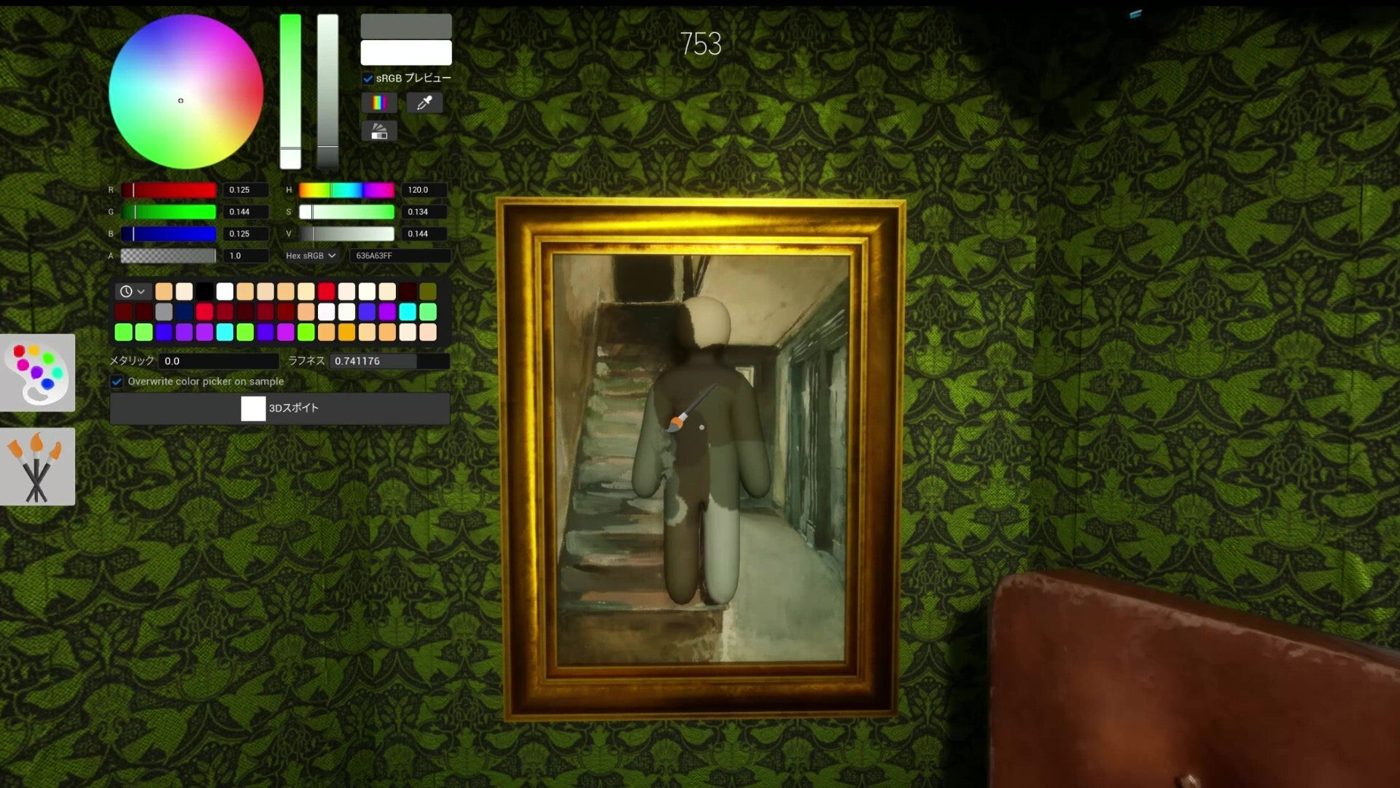
You're a chameleon. Paint yourself to match the environment. Don't get caught. That's the entire game, and it's the best $6 you'll spend on Steam this year. 15 million players can't be wrong.
How a Match Works
Every match follows a simple loop:
-
Prep Phase (30-60s): Find a spot. Sample colors. Paint yourself. Lock a pose. Seekers can't see you yet.
-
Hunt Phase (3-5 min): Seekers hunt. You freeze. Get caught = you're out. Survive = you win.
-
Results Phase (15s): Everyone's spots are revealed. Laugh at the ones you walked right past.
The Three Game Modes
| Mode | Rules | Best For | |------|-------|----------| | Basic | Classic hide-and-seek. Hiders win if at least one survives. | Beginners, learning maps | | Infection | Caught hiders become hunters. | Intense matches, the pressure ramps up | | Double | Everyone hides first, then everyone hunts. | Competitive play, tests both skills |
Start with Basic mode. It gives you time to learn the maps and mechanics without the escalating pressure.
Essential Controls You Need to Know
Movement
| Key | Action | |-----|--------| | WASD | Walk | | C | Crouch | | Space (hold) | Climb walls | | E / Q | Move up/down while on a wall | | Shift | Detach from wall |
Painting (Hider)
| Key | Action | |-----|--------| | F | Open paint menu | | R | Open pose wheel | | Space (in paint mode) | Eyedropper, samples whatever color you're pointing at | | V | Toggle character shadows off (CRITICAL, makes you look flat!) | | Right-click + move mouse | Adjust brush size | | Alt + right-click + move mouse | Zoom in while painting |
Clone & Camera
| Key | Action | |-----|--------| | Q | Create a decoy clone (max 2, 30s cooldown) | | X | Clear all clones | | 4 | Free-roam camera | | 5 | Auto-track hunters |
Seeker
| Key | Action | |-----|--------| | Left Mouse Button | Tag/eliminate hiders | | 2 | Drawing view | | 3 | Toggle nameplates |
Hider: 5 Tips to Stop Getting Caught Immediately
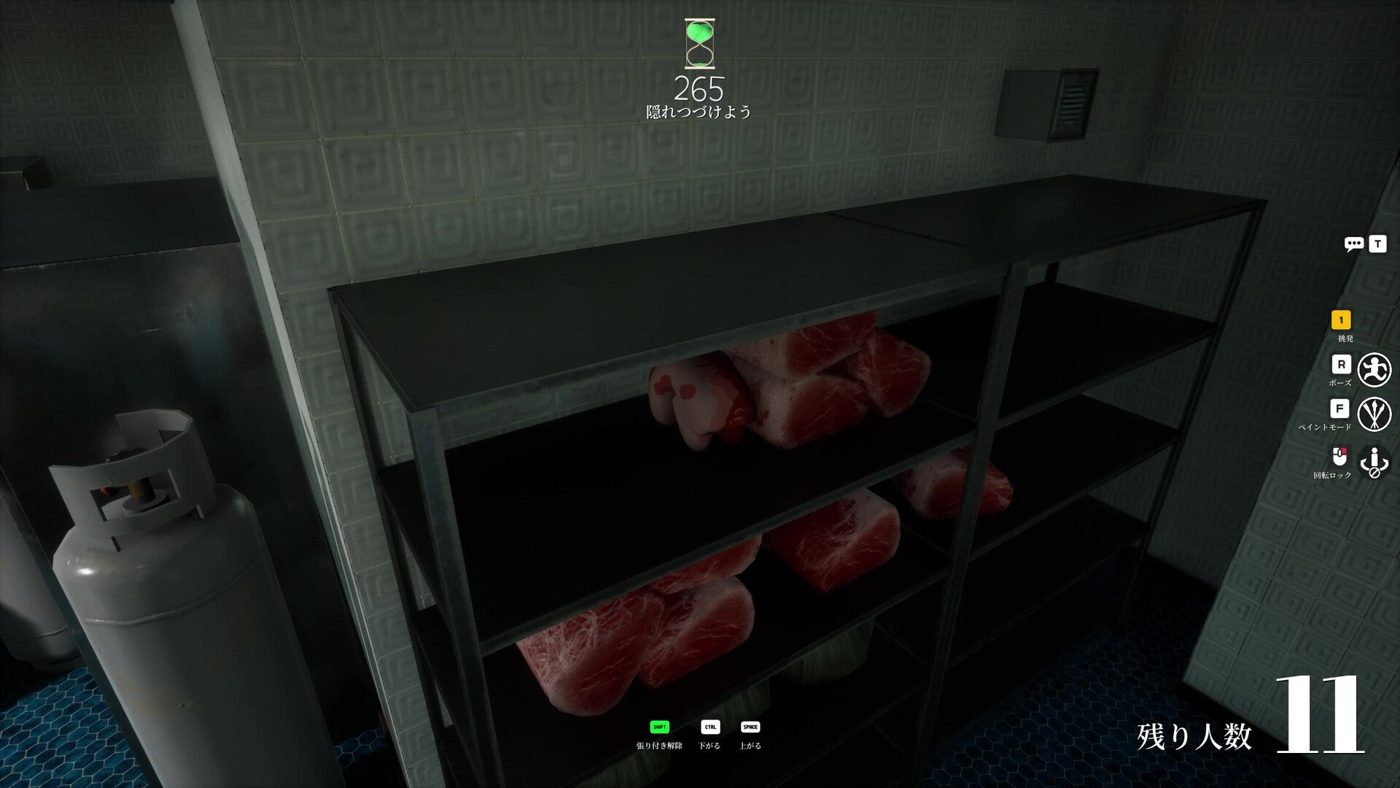
1. Pose First, Paint Second
Your human silhouette is your biggest giveaway. Before you even touch a color, press R and pick a pose that matches your hiding spot, lie flat against walls, curl up for small objects, stand upright for curved surfaces.
2. Always Use the Eyedropper
Never guess colors with your eyes. Press Space in paint mode and click directly on the surface you're hiding against. The computer is better at color matching than you are.
3. Turn Off Your Shadows
Press V to disable your character's shadow. This is the single most overlooked setting by beginners, leaving shadows on makes you look like a sticker plastered on the wall.
4. Adjust Roughness and Metallic
A perfect color match is useless if you're shiny against matte wood. In the paint menu, use the Roughness slider (higher = more matte) and Metallic slider (lower = less reflective) to match the surface texture. This is why you're still getting caught even with "perfect" color.
5. Hide in Clutter, Not Empty Spaces
Seekers naturally scan blank walls first. Hide among visual noise, stacked boxes, messy shelves, busy wallpaper patterns, clusters of objects. A imperfect paint job disappears in a busy background.
Seeker: 5 Tips to Find Anyone
1. Hunt Shapes, Not Colors
Experienced hiders nail their color matching. Instead, look for human-shaped outlines that don't belong, bumps on flat walls, heads poking above shelves, limbs in places limbs shouldn't be.
2. Hold Angles Against Walls
Stand flush against a wall and look along its surface. Anyone hiding on that wall will pop out from the edge. This is the #1 pro Seeker technique.
3. Check Corners and Ceilings
Most Seekers scan at eye level. Look up, skilled Hiders use the wall-climbing mechanic to cling to ceilings, rafters, and high corners where nobody looks.
4. Use Your Shotgun as a Flashlight
Firing the shotgun produces a muzzle flash that briefly illuminates dark corners. Use it to scan shadowy areas without changing your gamma settings.
5. Clear One Area Completely
Don't zigzag between rooms. Fully clear one zone before moving to the next. This prevents backtracking and ensures you don't miss a Hider who was outside your field of view.
Common Beginner Mistakes
| Mistake | Why You're Getting Caught | |---------|---------------------------| | Only matching color, not shape | Your human silhouette still screams "I'm a player!" | | Hiding in open, flat areas | No visual clutter to break up your outline | | Moving during the Hunt phase | Even a tiny twitch is instantly visible | | Reusing the same spot | Veterans learn the meta; always rotate | | Forgetting to check your back | What looks perfect from the front may be broken from the side |
Quick FAQ
Q: Is the game cross-platform? A: No. Meccha Chameleon is currently PC-only (Steam). No console or mobile versions exist yet.
Q: How do I play with friends? A: Create a lobby, set a password, and share the server name. Friends can search for your lobby in the server browser. All players need the same custom map subscribed if you're using one.
Q: What are the minimum PC specs?
A: The game is lightweight and runs on most modern PCs. For low-end machines, lower the resolution scale to 80-85%, set shadows to Low, and add -dx11 to Steam launch options.
Q: Can I create my own maps? A: Yes! Custom maps are made with Unreal Engine 5 and uploaded to the Steam Workshop. Subscribing to workshop maps is simple, click Subscribe and the game auto-downloads them.
Common Beginner Mistakes
- Painting before you pose. If you paint first then lock a pose, your paint job shifts and your colors no longer match the surface. Always lock your pose with R first, then paint.
- Leaving shadows on. This is the single most overlooked setting. With shadows on, you cast a dark blob on the surface behind you. Seekers see this instantly. Press V every match.
- Hiding on blank walls. New players pick the first wall they see. Seekers scan blank walls first. Hide in clutter: shelves, boxes, posters, anything that breaks up your silhouette.
- Ignoring roughness and metallic. A perfect color match doesn't matter if you're shiny against matte wood. Adjust the Roughness and Metallic sliders after every paint job.
- Using clones too early. Clones are high-risk. If a hunter shoots yours, you die too. Master basic hiding first. Clones are for players who can already survive full rounds.
Related Guides
- all 7 maps and hiding spots
- unlock all 5 secret skins
- fix your camouflage settings
- all 3 game modes
- every keybind reference
What to Learn Next
Now that you know the basics, dive deeper:
- Map Guides, Master every hiding spot on all 7 official maps
- Secret Skins, Unlock all 5 hidden character skins
- Advanced Camouflage, Learn roughness, metallic, and lighting techniques
- Hunter Mastery, Angle-holding, pattern recognition, and pro seeker tactics
Sources
This guide was compiled from multiple public sources. We cross-reference with 3+ sources before publishing.
More Meccha Chameleon Guides
Meccha Chameleon Updates 2.6 & 2.7 : Egypt Map, HIKAKIN Museum & Clone Controversy
Two major Meccha Chameleon updates dropped. Egypt and HIKAKIN Museum maps, random map toggles, Penguin Hotel randomization, and a clone game causing controversy.
Meccha Chameleon July Patch Roundup : New Mode, Osaka Rework & Hunter Ammo Limits
Every Meccha Chameleon update in July 2026. Reverse Chicken Race mode, hunter bullet limits, Osaka map rework, new rotation mechanics, and the upcoming collaboration map.
Meccha Chameleon vs Among Us vs Prop Hunt : Which Hide & Seek Game Is Best in 2026?
Complete comparison of the top 3 hide-and-seek multiplayer games in 2026. Meccha Chameleon vs Among Us vs Prop Hunt : gameplay, skill ceiling, price, player count, and which one is right for your group.